
HW2 - Webscraping
Webscraping IMDB For Show/Film Recommendations
For this assignment post we’re going to approach the idea of media recommendations in a way that builds experience with webscraping basics. More specifically, we hope that by answering the question “What movie or TV shows share actors with your favorite movie or show?” we can extrapolate some recommendations from the resultant data. The proposed logic is as follows: “if TV show Y has many of the same actors as TV show X, and you like X, you might also enjoy Y.” Simple enough, right?
Here we’re going to first follow the assignment spec as exactly as possible, and highlight some of the pitfalls of the raw data…then, in a later part, show how, by refining the question and nailing down more rigorous definitions of what our language and intent really mean, we can, with the same basic scraping, tools get better results. As always, the machine doesn’t know what you mean, only what you explicitly say…so consider this an extension of our ongoing theme of applying the principles of good study design and proper translation of semantic intent to work smarter, not harder, with a limited computational toolkit.
The repository for the scraper can be found here.
Initial Setup
First, create a new GitHub repository, and sync it with GitHub Desktop. This repository will house your scraper.
Second, you will need to actually create a scrappy project. Open your terminal in the location of your repository and enter:
conda activate PIC16B
scrapy startproject IMDB_scraper
cd IMDB_scraper
See all the files? You only have to worry about the settings.py file. In this file you can add the following to keep your scrape nice and short (in this case 20 pages) to test things out. Simply comment it out when you want to perform the whole scrape.
CLOSESPIDER_PAGECOUNT = 20
Writing Your Scraper
Create a file inside the spiders directory called imdb_spider.py. Add the following lines to the file:
# to run
# scrapy crawl imdb_spider -o movies.csv

import scrapy

class ImdbSpider(scrapy.Spider):
    name = 'imdb_spider'

    start_urls = ["https://www.imdb.com/title/tt0804503/"]
Replace the entry of start_urls with the URL corresponding to your favorite movie or TV show. I’m going to use Mad Men, since it has great rewatch value—character driven drama with an ensemble cast doesn’t rely much on the sort in the moment, social phenomenon, “what happens next?!” hype—and the high episode count and high number of mid-tier prestige actors in it makes for a good illustrative dataset.
Next, we’re going to write the methods for this class that implement our scrape
def parse(self, response):

    #join current url w/ string to create url to full credits page
    next_page = response.urljoin("fullcredits")

    if next_page: #if it exists, which it should, every IMDB listing has one...
    #Pass next_page to the Request OBJ of this spider, set the callback function to invoke the parse
    #method (since Python can't just say member function and has to remind me of Java) for full credts
        yield scrapy.Request(next_page, callback = self.parse_full_credits)
This first parse method presumes you have started on the main page for the show or film in question and calls the urljoin method of our spider’s response object to append “fullcredits” to our starting url. From here, we pass this new url (for the full credits page of our show) to the spider’s request object, and set the callback to invoke our next method on that page. This next method (shown below) will parse the url’s for each actor on the full credits page.
def parse_full_credits(self, response):

    #create list of relative paths for each actor (clicking on a headshot)
    actor_list = [a.attrib["href"] for a in response.css("td.primary_photo a")]

    #iterate through each actor path in the list
    for actor in actor_list:

        #join relative path to existing url
        actor_page = response.urljoin(actor)

        if actor_page: #if it is not null
            #Pass the url to this spider's request OBJ, set callback to invoke
            #the method to parse an actor's page
            yield scrapy.Request(actor_page, callback = self.parse_actor_page)
This method mimics clicking on each actors headshot on the full credits page. It works by creating a list of the hyperlink modifiers(via the shown list comprehension) from the list returned by the response.css query. Basically, “for each element in the list returned by the response.css query, take the href attribute and put them all in a list called actor_list.” Here, “td.primary_photo a”, is the css selector for each headshot of an actor on the full credits page. From here, for each of these relative paths, we use urljoin to set the url to that actor’s IMDB page, check that this url is valid (not null), and proceed to pass it to request, and then invoke our next method to parse that actor’s page via our callback parameter.
Below is the aforementioned method to parse a specific actor’s page:
 def parse_actor_page(self, response):

    #Pull actor name from header
    actor_name = response.css("h1.header > span:nth-child(1) ::text").get()

    #Pull all titles in the css selector list returned by our reponse query
    credits = response.css("div.filmo-category-section div.filmo-row b a ::text").getall()

    #iterate through the credits
    for title in credits:
        #yield an output dict
        yield { "actor" : actor_name, "title" : title }
The intent for this method is to pull the actors name and all of there credits, and yield dicts of the format { “actor” : actor_name, “title” : title }, which in turn each become an entry in our results.csv, which has a column for actor name and a column for the title of the show/film they appeared in.
How it works:
- “h1.header > span:nth-child(1) ::text” is the css selector for the actors name, which is always in this exact location on every actor page. You don’t need generalized selector here, you can just find this element on inspector and copy the selector for it. Then, invoking .get() on our response query output pulls the text for the name and we assign it to a holder variable for later use.
- The credits are a bit trickier, you need to determine what identifiers all the show/film titles share that distinguish them from other elements such that a query yields only these titles and only the text from them.
- “div.filmo-category-section” narrows things down to just the actor’s filmography
- “div.filmo-row” narrows it down to a row entry in the filmography
- “b” narrows further to the film title portion of the entry
- “a” narrows it to the hyperlink to that title’s page
- ”::text” finally specifies just the text within a, not the entire link
- Invoking .getall() on the output of our response.css query then pulls everything that satisfies this css selector, in this case the text of every title in that actor’s filmography. This results in a list, which we assign a variable named credits.
- Finally, we iterate through each title in credits and yield a dict as described above.
Now let’s put it all together, with proper documentation, as it would look in your .py file:
class ImdbSpider(scrapy.Spider):
    '''
    Scrappy spider OBJ to crawl IMDB. Inherits from scrapy spider (scrapy.Spider)

    Methods
    -------
    parse: function to go from start page to full credits
    parse_full_credits: pulls paths for each actor in credits
    parse_actor page: scrapes an actor's page

    '''

    #name our spider (used to run crawl via command line)
    name = 'imdb_spider'

    #starting url for the crawl - show or movie page (Mad Men in this case)
    start_urls = ["https://www.imdb.com/title/tt0804503/"]

    def parse(self, response):
        '''
        Function starts at the class's set start_url and joins to it "fullcredits",
        then passes that next page to scrapy Request OBJ and invokes parse_full_credits
        as the callback.

        Parameters
        ----------
        self: the IMDB spider OBJ itself
        response: Response OBJ of this spider (inherited from scrapy.Spider)
        '''
        #join current url w/ string to create url to full credits page
        next_page = response.urljoin("fullcredits")

        if next_page: #if it exists, which it should, every IMDB listing has one...
            #Pass next_page to the Request OBJ of this spider, set the callback function to invoke the parse
            #method (since Python can't just say member function and has to remind me of Java) for full credts
            yield scrapy.Request(next_page, callback = self.parse_full_credits)

    def parse_full_credits(self, response):
        '''
        Function to build a list of relative paths for each actor in the full credits and
        then for each path, invoke parse_actor_page as the callback arg of a Request
        given the url built from that path, to scrape that actor's page.

        Parameters
        ----------
        self: the IMDB spider OBJ itself
        response: Response OBJ of this spider (inherited from scrapy.Spider)
        '''
        #create list of relative paths for each actor (clicking on a headshot)
        actor_list = [a.attrib["href"] for a in response.css("td.primary_photo a")]

        #iterate through each actor path in the list
        for actor in actor_list:

            #join relative path to existing url
            actor_page = response.urljoin(actor)

            if actor_page: #if it is not null
                #Pass the url to this spider's request OBJ, set callback to invoke
                #the method to parse an actor's page
                yield scrapy.Request(actor_page, callback = self.parse_actor_page)

    def parse_actor_page(self, response):
        '''
        Function to scrape and actor's credits page and yield a dict of the form
        { "actor" : actor_name, "title" : title } for each credit on that page.

        Parameters
        ----------
        self: the IMDB spider OBJ itself
        response: Response OBJ of this spider (inherited from scrapy.Spider)

        '''
        #Pull actor name from header
        actor_name = response.css("h1.header > span:nth-child(1) ::text").get()

        #Pull all titles in the css selector list returned by our reponse query
        credits = response.css("div.filmo-category-section div.filmo-row b a ::text").getall()

        #iterate through the credits
        for title in credits:
            #yield an output dict
            yield { "actor" : actor_name, "title" : title }
Running It
Cool, you’re now ready to go. Enter the following command in the terminal to run your scraper:
scrapy crawl imdb_spider -o results.csv
Note: if you’ve closed your prior terminal window, you will have to repeat the prior “conda activate PIC16B” command. Scrapy lives within your python environment, outside of this scope that name doesn’t really mean much.
Note Note: where, in terms of current directory, you run this command from will determine where your results.csv will end up. So, just be aware of this, as it’s the difference between finding your results in say, “/Documents/GitHub/IMDB_scraper/IMDB_scraper/”, vs “/Documents/GitHub/IMDB_scraper/IMDB_scraper/IMDB_scraper” …the default directory structure of a scrapy is fairly nested/layered, so don’t fret, your resultant output data is in there somewhere.
Breaking this command down a bit:
- “scrapy” fairly self explanatory, states that this command is meant for scrapy
- “crawl” calls the crawl command (technically an object itself)
- “imdb_spider” specifies the spider to run
- “-o results.csv” is your standard, linux style, way of specifying the name of our output file…if you’ve ever compiled using G++, same syntax, you’re back in makefile land.
Doing Data Stuff
So now that you have your scrape output, let’s get it into pandas and take a look. As always import our usual friends and read in our csv.
An aside: Pandas is built on top of numpy, so numpy is a pandas dependency you need to have installed and pandas will call it internally. So why does basically every tutorial import them together? Well, normally at some point in such tutorials you will explicity use numpy for some computation. Will we use it here? Not in this first part…though it remains to be seen if I will in the second. So why import it? Because every tutorial and professor before me has, so for most of us, implicit numpy, pandas functionality and explicit numpy blur together. You know what’s frustrating? Attempting something using only pandas specific syntax that needs some particular sort of vector math and not getting why it isn’t working until you realize you never imported numpy. So, the viscious cycle continues and we’re unoptimally including numpy just in case.
#Import usual suspects as needed
import pandas as pd
import numpy as np
#read in csv output from our scrapy
imdb = pd.read_csv("~/Documents/GitHub/IMDB_scraper/IMDB_scraper/results.csv")
imdb.head()
| actor | title | |
|---|---|---|
| 0 | Aaron Hart | Zero Point |
| 1 | Aaron Hart | Arthur |
| 2 | Aaron Hart | Freedom Riders |
| 3 | Aaron Hart | Criminal Minds |
| 4 | Aaron Hart | Ghost Whisperer |
Great, everything looks as expected. Let’s take a look at the magnitude of what we’re working with:
imdb.shape
(55324, 2)
55,324 rows, each one a show/film entry…well with 7 seasons of 13 episodes each, we got an understandably large data set.
Since all these actors have Mad Men in common, that’s a useless data point, so let’s drop any entries with “Mad Men” as the title, and call shape on our dataframe to make sure it worked and see how many rows we dropped:
og_imdb = imdb #save our original, you'll see why
imdb.drop(imdb[imdb["title"] == "Mad Men"].index, inplace = True)
imdb.shape
(54317, 2)
We dropped 1,007 rows, which, since it’s fair to assume all, to very nearly all, of these actors only played one character on Mad Men, and thus only have one Mad Men credit listed each, that our actor count is around 1,007. Let’s check for certain:
unique_actors_before = og_imdb["actor"].value_counts()
print("Actor count before drop: " + str(unique_actors_before.size))
unique_actors_after = imdb["actor"].value_counts()
print("Actor count after drop: " + str(unique_actors_after.size))
Actor count before drop: 970
Actor count after drop: 970
Huh, so we have 970 unique actors, but dropped 1,007 rows, what explains that difference? Well, if we look at, for instance, Jon Hamm’s IMDB page, we see that he’s credited as a director for an episode of Mad Men, and curiously on the soundtrack for another two episodes. So what has occured is that by using a css selector for entries within an actor’s filmography in general, we’ve included entries like these where prominent stars get a random producer or director credit or two, along with appearances where they play themselves.
It turns out that the demarcation for the “actor” subsection is an id attribute that is gendered—i.e. actor or actress depending on the person in question—so you would need to partial match on the shared substring of that attribute, in this case “actr”. But, as we’ll see, it doesn’t make a difference for now. This sub-single-digit percentage inefficiency (the bit-part actors that make up the bulk of this data aren’t getting these sort of credits on their own page) doesn’t change our top “shared actors ranking”. Our top 10 will all score in the hundreds such that SNL appearances by show’s few breakout stars, or common participation in a documentary’s voiceovers, don’t make a difference. However, later on we will start to narrow things down in such a way that these sort of details do matter.
For now, let’s move on and group our entries by title, do a little clean up, and count the occurances of each title.
#group by title, count occurances
titlecount = imdb.groupby("title").count()

#reindex, as is "title" is the index
#imdb.reset_index

#rename actors column - now a count of actors credited on both this title and our original
titlecount = titlecount.rename(columns={ "actor" : "shared actors"})

#sort values (most actors in common to least)
titlecount = titlecount.sort_values(by = ["shared actors"], ascending = False)

top10 = titlecount.head(10)
top20 = titlecount.head(20)
top20
Index(['NCIS', 'Criminal Minds', 'CSI: Crime Scene Investigation',
       'Grey's Anatomy', 'ER', 'Without a Trace', 'Bones', 'Cold Case',
       'Castle', 'The Mentalist', 'Desperate Housewives',
       'The Young and the Restless', 'CSI: NY', 'CSI: Miami', 'Boston Legal',
       'NCIS: Los Angeles', 'The West Wing', 'Days of Our Lives',
       'The Practice', 'Law & Order'],
      dtype='object', name='title')
Or to present it graphically as per the given spec:
import matplotlib.pyplot as plt
import seaborn as sns

sns.set_theme(style="whitegrid")
#note, our groupby OBJ has title as the index, not a column
ax = sns.barplot(x = top10.index, y = "shared actors", data = top10)
#resize
sns.set(rc = {'figure.figsize':(30,7)})

plt.show()
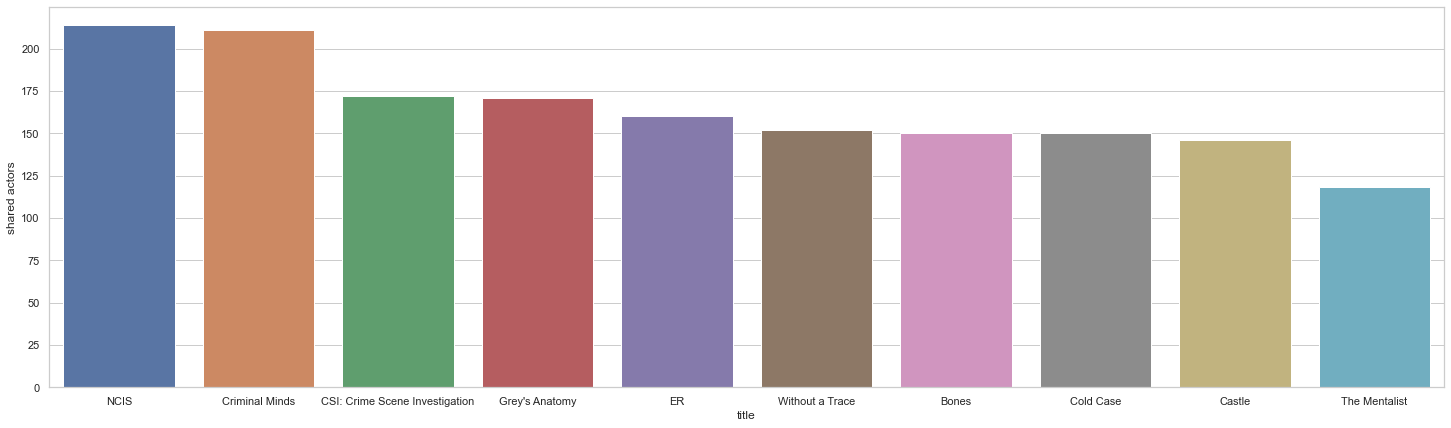
So here we have it, our findings!
What do they say? Basically nothing. This list is entirely procedural shows and soap operas. Even if significant known actors from your favorite show, rather than the guy who played a janitor in one episode, made it up the bulk of this shared actor count, they’d likely be in a single episode as a guest star.
Who’s the murder on this week’s NCIS? Probably the most famous person not in the regular cast.
Day’s of our lives has been running since 1965 for over 14,000 episodes…NCIS for 432 episodes (ongoing) since 2003…Grey’s Anatomy for 401 episodes (also still going) since 2005…CSI for 365 episodes from 2000 to 2015…you get the idea. I’d wager that any other PIC16B student’s top 10 for any movie or show looks like this.
To put it in study design terms, we have terrible construct validity: we’ve just measured what shows have a lot of episodes, over a long time frame, with high rates of cast turn over episode to episode. Or to put it even less abstractly, we’ve inadventantly just measured what IMDB pages have the most actors on them.
How does this work as a recommendation list? As a measure of genre or content similarity it fails: you get a list of procedural shows regardless of what show/film you start from. As a measure of the likelyhood of seeing actors you know/like, or even just like the work of in anonymous way, it fails. I’m willing to bet the mean episode count for a given Mad Men actor on a procedural like NCIS does not stray too far from 1. Running with this and further assuming that Mad Men actors are uniformly distributed amongst episodes, you have roughly a 50% (214/432) chance of seeing a Mad Men actor, regardless of if you recognize them or the significance of their role, in any given NCIS episode.
So how do we make this better? Well let me give you a preview of some ideas from my coming update to this post, tentatively titled “Part 2: David goes off the rails”:
- Restrict the scrape to top billed cast in your starting show/film
- Refine the css selector to only pull acting credits (as shared actor counts drop, these false positives will be more noticable)
- Condition your spider such that if the css selector for a tv show is found you:
- Weigh each actor by the number of episodes in your starting show they appear in
- Weigh each shared title by a composite of the original actor’s weight and the number of episodes in that shared title the actor appears
- Perhaps better visualize these realtionships in the form of network graphs via plotly’s networkx.